'Advanced File Mode' Supported Output Formats
Document Category
| File Type | Usage |
|---|---|
| docx | Word Document (Reports, Contracts, Letters, etc.) |
| PDF Document (Official Documents, Presentation Printing) | |
| txt | Plain Text File |
| md | Markdown Document |
| html | Web Page File |
| json | Data Exchange Format |
Presentation
| File Type | Usage |
|---|---|
| pptx | PowerPoint Presentation (Editable) |
| ppsx | PowerPoint Slide Show (Play Directly) |
Report
| File Type | Usage |
|---|---|
| xlsx | Excel Spreadsheet (Data Tables, Statistical Analysis) |
Technology and Others
| File Type | Usage |
|---|---|
| py | Python Code |
| csv | Comma-Separated Data File |
| Scalable Vector Graphics | Vector Graphics |
| mid | MIDI Music File |
| odf | OpenDocument Formula (MathML) |
| drawio | draw.io Flowchart/Diagram |
How to Use 'Advanced File Mode'
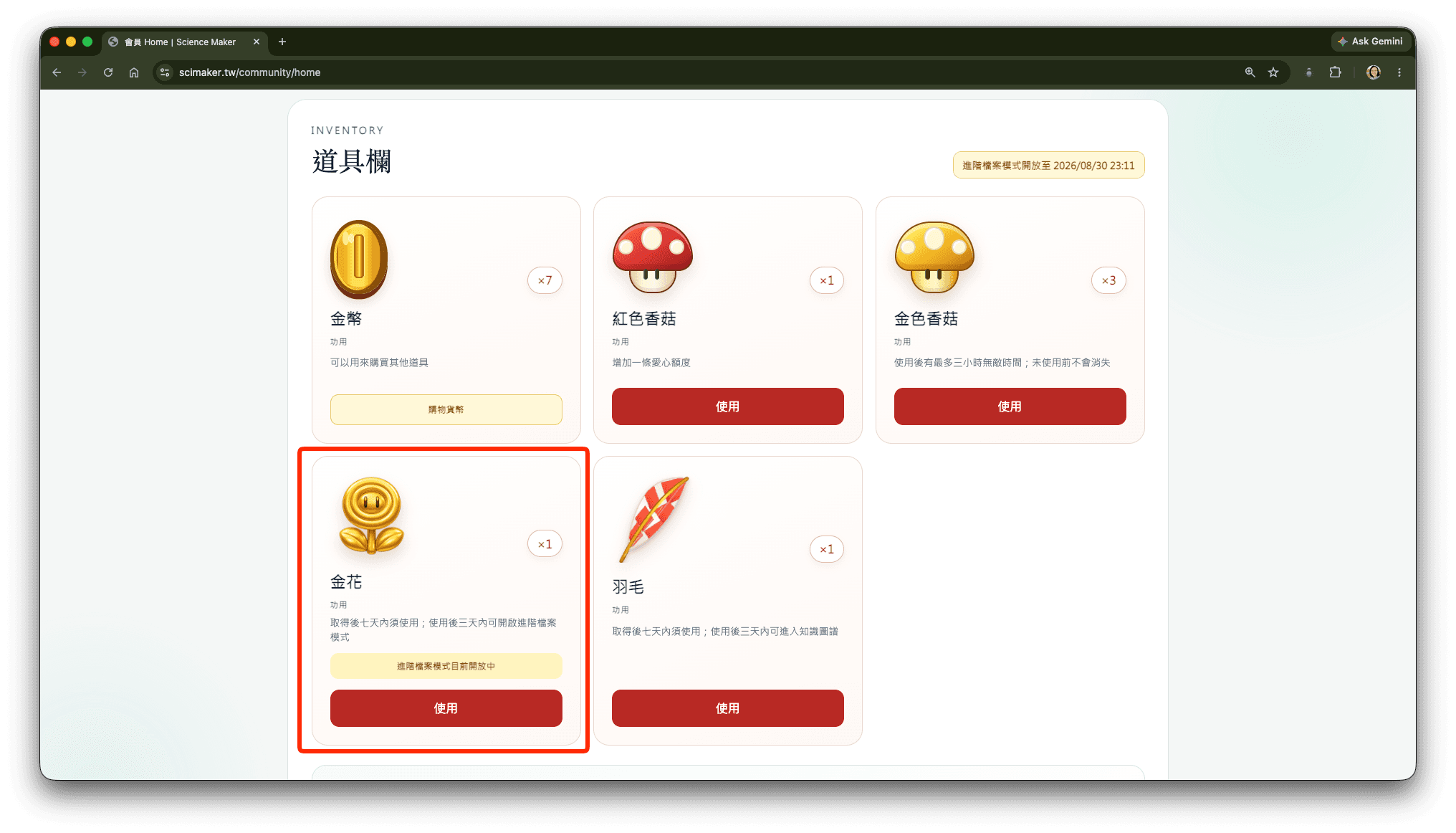
1. Use the 'Golden Flower' Item
Since all Fable-talk models in the current AI conversation space operate locally with limited resources, only users who possess the 'Golden Flower' item will have permission to enable 'Advanced File Mode'.
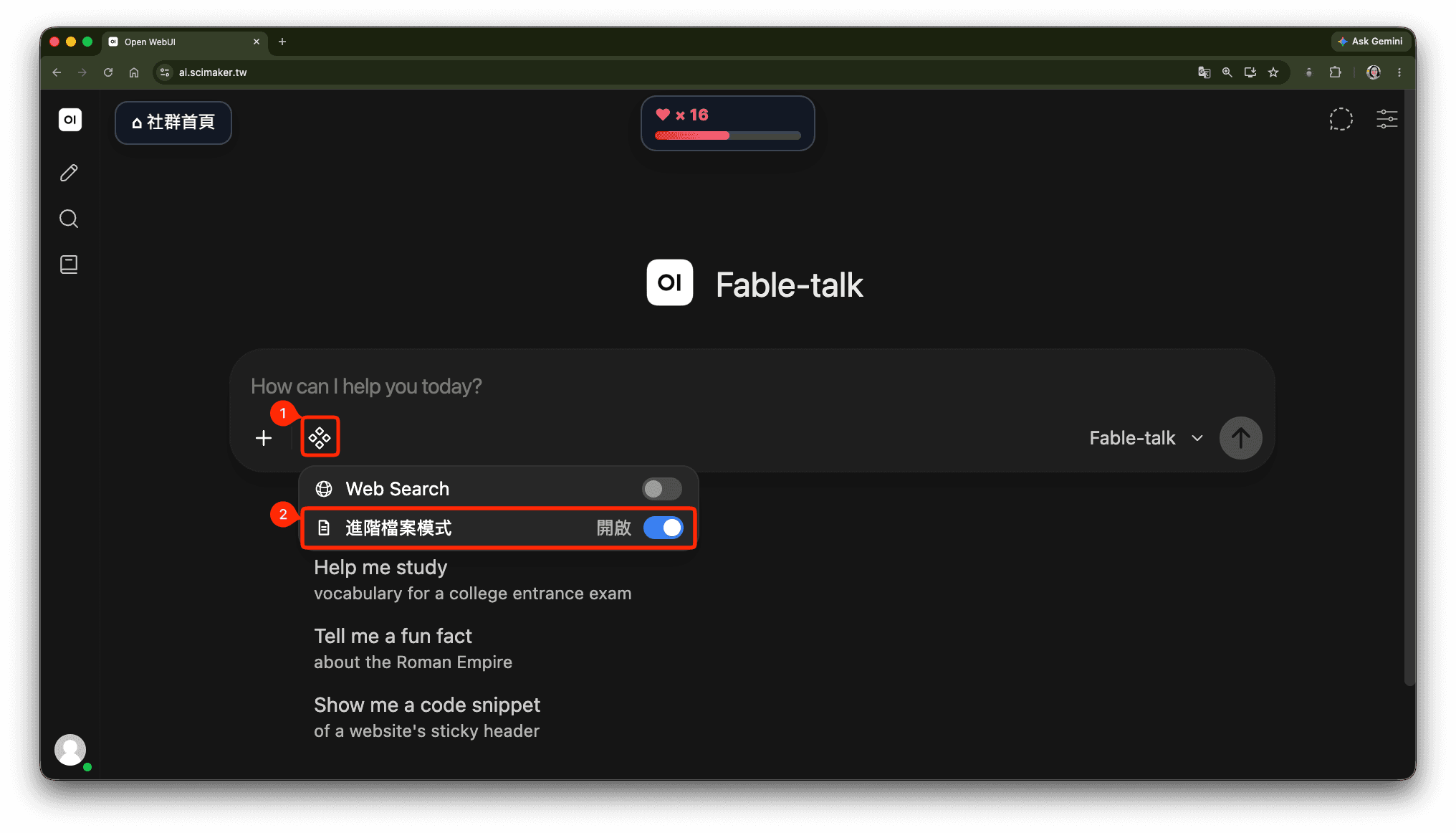
2. Enable 'Advanced File Mode'
To prevent excessive data loss, this feature is disabled by default. Even if you previously enabled it, the mode will be closed automatically when you leave the conversation window. Before submitting your message, please confirm that 'Advanced File Mode' is enabled.
Testing Process for Using 'Advanced File Mode'
Note: Files can only be downloaded within 24 hours. After this period, downloads will no longer be available.
(1) Convert 'drawio Flowchart' to 'pptx Presentation File'
This is a file output test based on the theme of 'History of Programming Languages.' Recently, I became interested in drawio and noticed that the output format includes drawio, making it the first format I wanted to test for output.
Within the same conversation, first understand how to describe 'creating a drawio flowchart depicting the evolution of programming languages.' The conversation content is as follows:
Then I asked Fable-talk to generate a drawio flowchart, during which I encountered issues where the files couldn't be opened, along with subsequent solutions:
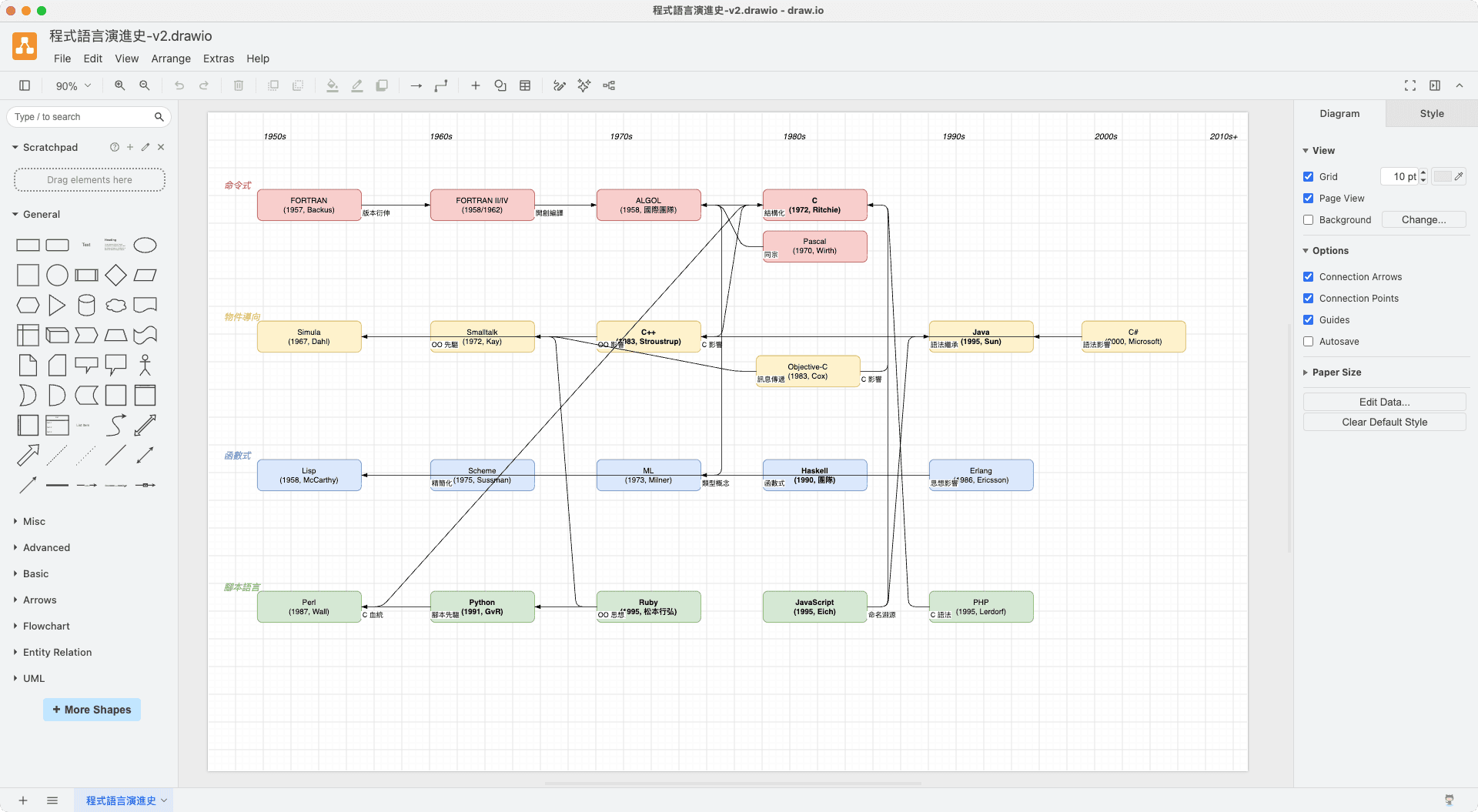
After it could be opened normally, I tried converting the drawio flowchart into a pptx presentation file:
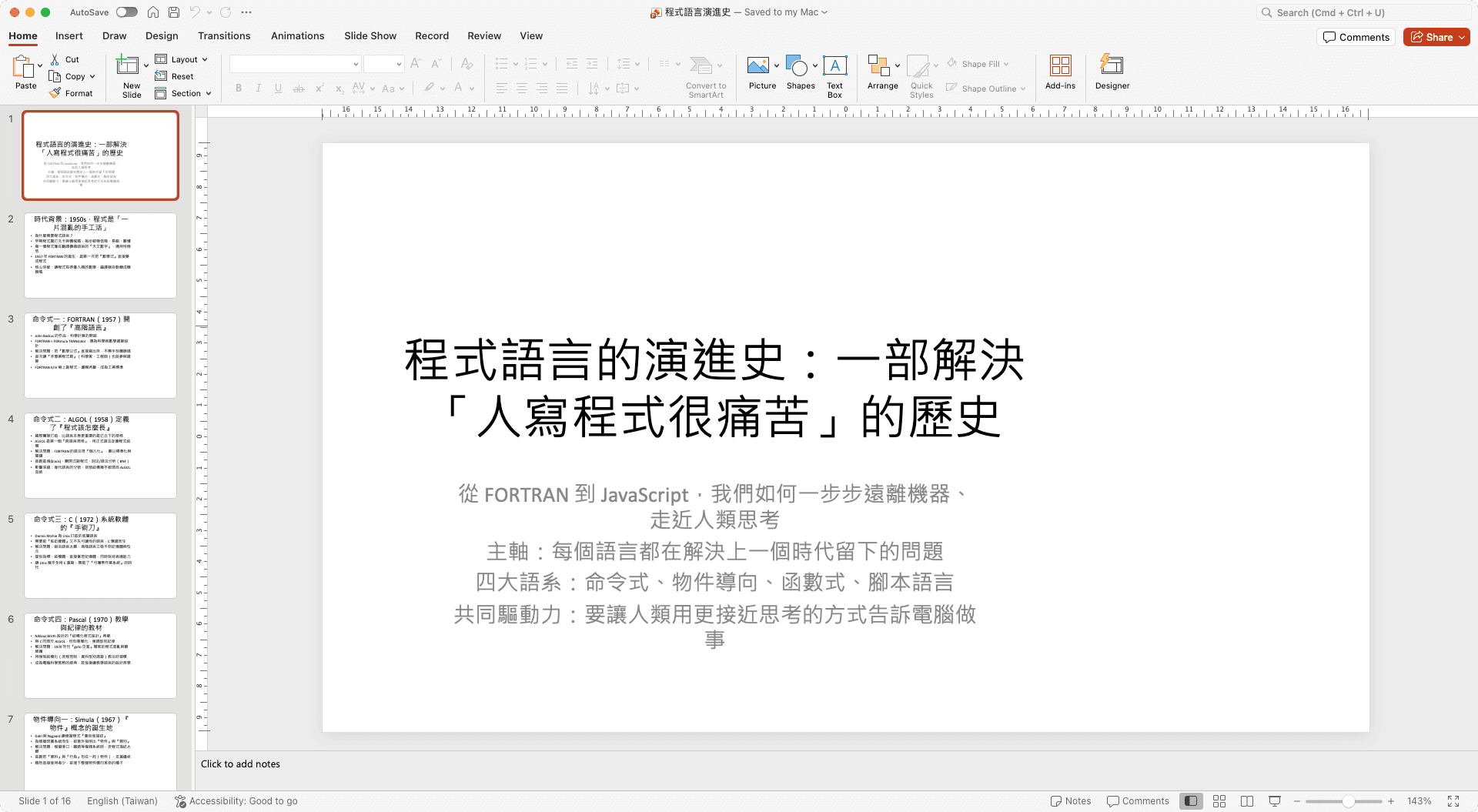
Please ask Fable-talk to supplement more detailed information and create additional reference materials as an extension:
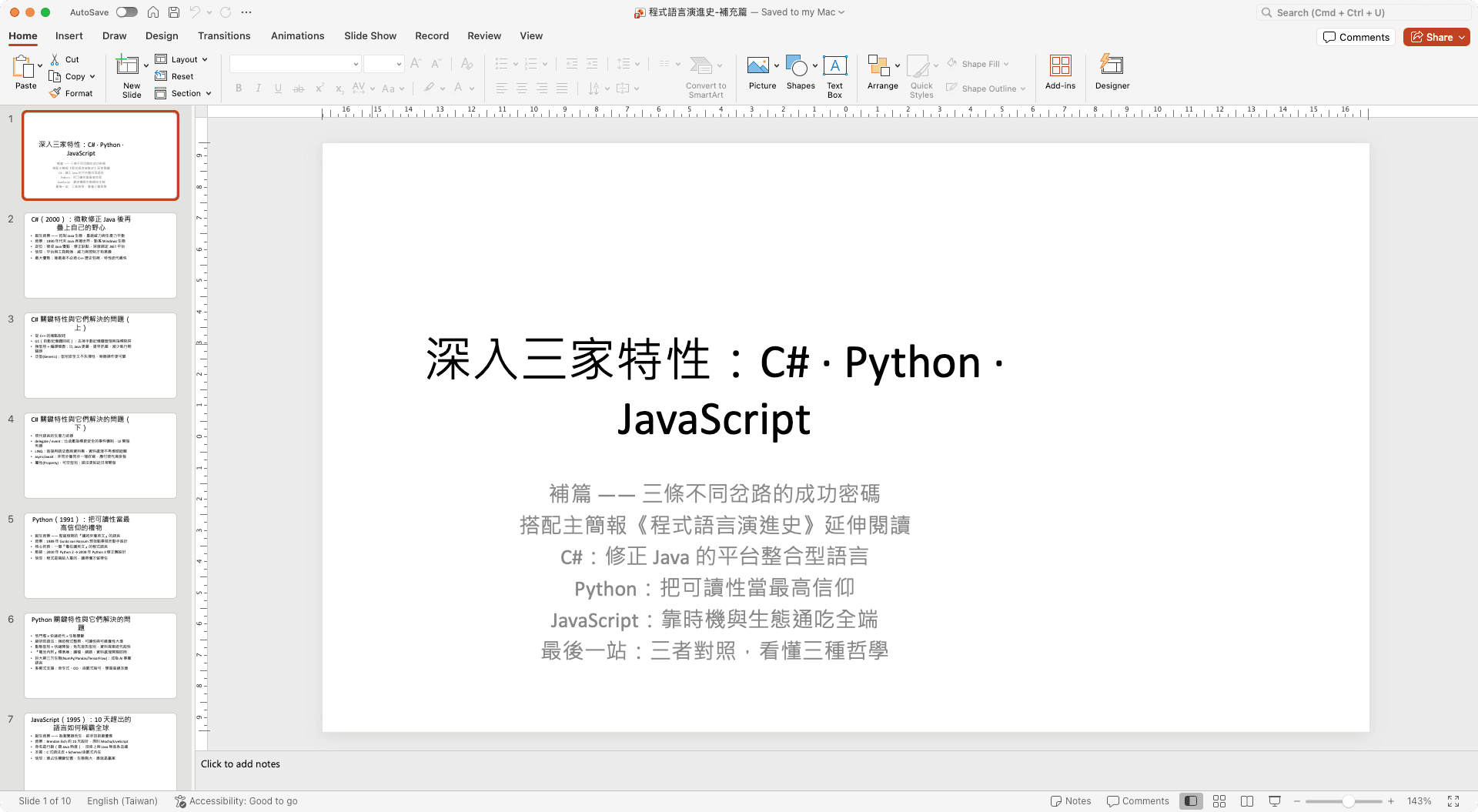
(2) Generate an HTML Mario game
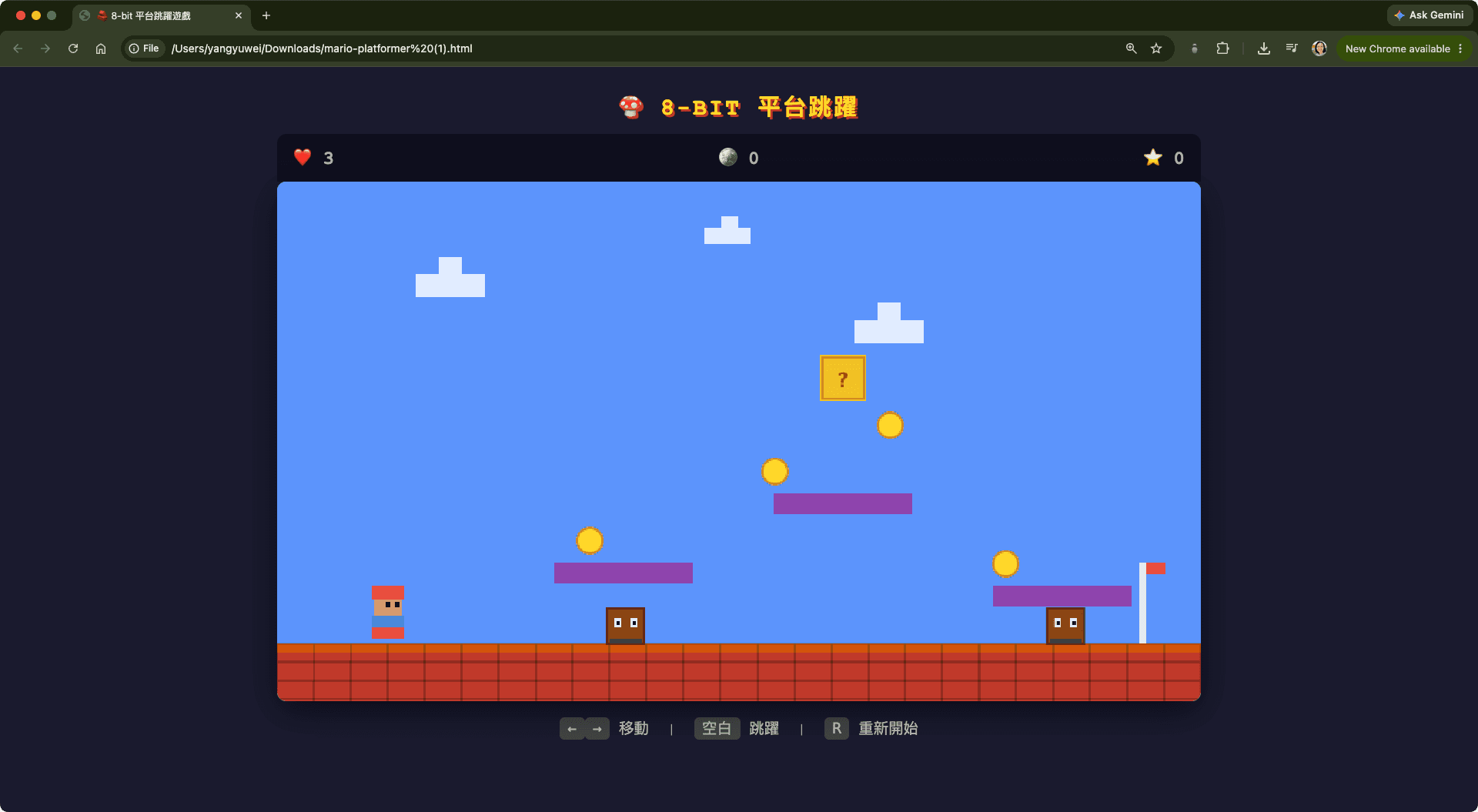
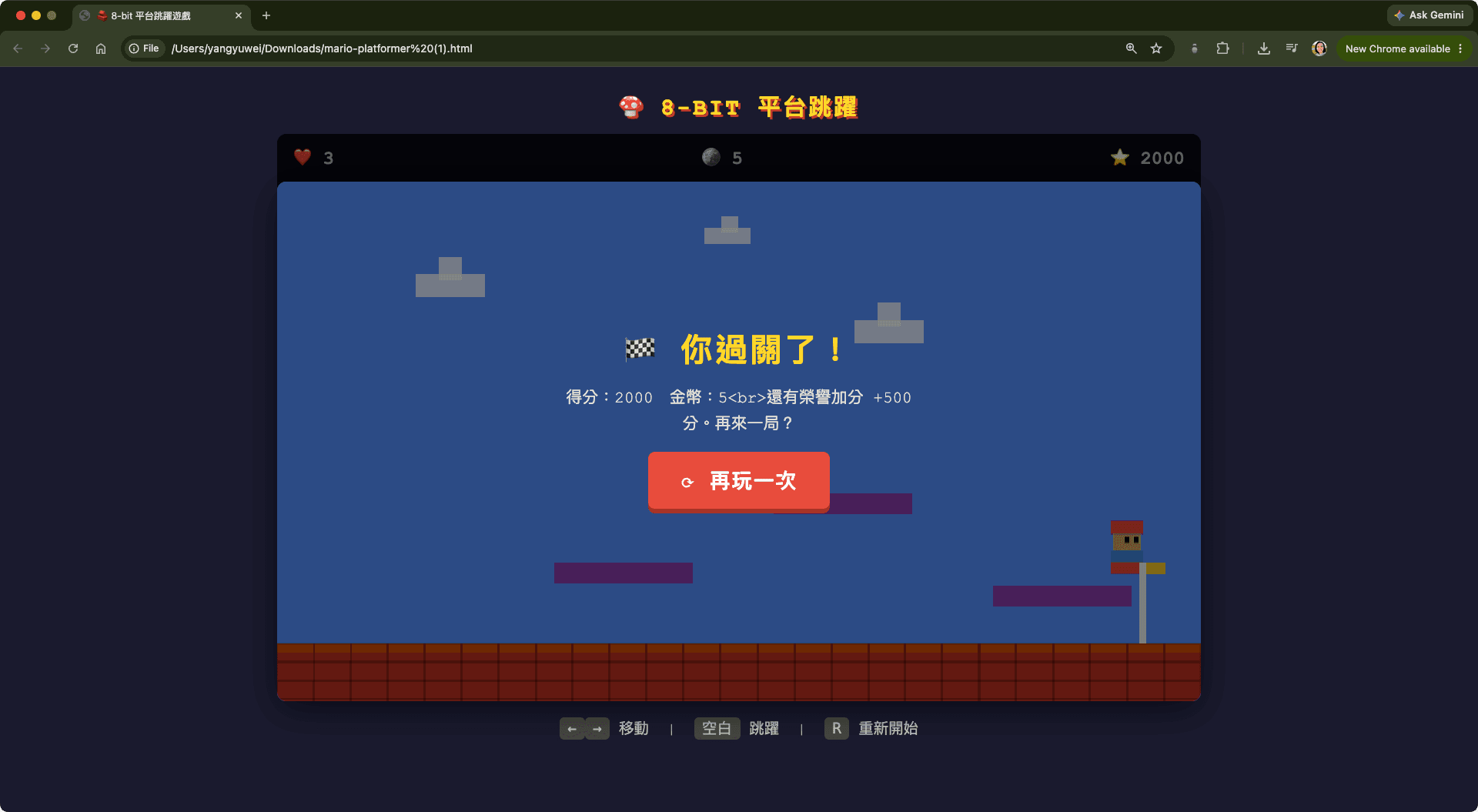
Among the 15 output formats, one is audio. To test the audio generation capability, I asked Fable-talk to create a simple Mario game, and it actually had sound—truly impressive!
Since files can't be downloaded after 24 hours, I've directly pasted the HTML code here:
1<!DOCTYPE html>
2<html lang="zh-Hant">
3<head>
4<meta charset="UTF-8">
5<meta name="viewport" content="width=device-width, initial-scale=1.0">
6<title>🧱 8-bit 平台跳躍遊戲</title>
7<style>
8 * { margin: 0; padding: 0; box-sizing: border-box; }
9 body {
10 background: #1a1a2e;
11 font-family: 'Courier New', monospace;
12 display: flex; flex-direction: column; align-items: center;
13 min-height: 100vh; color: #fff; padding: 20px;
14 }
15 h1 { margin-bottom: 10px; font-size: 20px; letter-spacing: 2px; color: #ffd700; text-shadow: 2px 2px 0 #c0392b; }
16 #gameWrap { position: relative; }
17 canvas {
18 display: block; background: #5c94fc;
19 border-radius: 8px; box-shadow: 0 8px 30px rgba(0,0,0,.5);
20 image-rendering: pixelated;
21 }
22 #hud {
23 display: flex; justify-content: space-between; width: 100%;
24 padding: 10px 14px; background: rgba(0,0,0,.35); border-radius: 8px 8px 0 0;
25 font-size: 16px; font-weight: bold;
26 }
27 #hud span { color: #ffd700; }
28 #hud .label { color: #aaa; }
29 #overlay {
30 position: absolute; inset: 0; display: flex; flex-direction: column;
31 align-items: center; justify-content: center; background: rgba(0,0,0,.55);
32 border-radius: 8px; text-align: center; gap: 12px;
33 }
34 #overlay.hidden { display: none; }
35 #overlay h2 { font-size: 28px; color: #ffd700; letter-spacing: 2px; }
36 #overlay p { font-size: 14px; color: #ddd; max-width: 320px; line-height: 1.6; }
37 button {
38 font-family: inherit; font-size: 18px; font-weight: bold; padding: 12px 28px;
39 background: #e74c3c; color: #fff; border: none; border-radius: 6px;
40 cursor: pointer; letter-spacing: 1px; box-shadow: 0 4px 0 #a93226;
41 transition: transform .05s;
42 }
43 button:hover { transform: translateY(-2px); }
44 button:active { transform: translateY(2px); box-shadow: 0 0 0 #a93226; }
45 #controls { margin-top: 14px; font-size: 13px; color: #bbb; }
46 kbd { background: #444; padding: 2px 7px; border-radius: 4px; font-family: monospace; }
47</style>
48</head>
49<body>
50 <h1>🍄 8-BIT 平台跳躍</h1>
51 <div id="gameWrap">
52 <div id="hud">
53 <span>❤️ <span class="label" id="hudLives">3</span></span>
54 <span>🪙 <span class="label" id="hudCoins">0</span></span>
55 <span>⭐ <span class="label" id="hudScore">0</span></span>
56 </div>
57 <canvas id="game" width="800" height="450"></canvas>
58 <div id="overlay">
59 <h2 id="overlayTitle">🍄 瑪利歐小冒險</h2>
60 <p id="overlayDesc">收集金幣、踩扁蘑菇怪,抵達終點旗竿!<br>
61 使用 <kbd>←</kbd> <kbd>→</kbd> 移動,<kbd>空白</kbd> 跳躍。
62 碰到敵人會扣一條命,踩到牠們頭頂則能消滅。</p>
63 <button id="startBtn">▶ 開始遊戲</button>
64 </div>
65 </div>
66 <div id="controls">
67 <kbd>←</kbd><kbd>→</kbd> 移動 | <kbd>空白</kbd> 跳躍 | <kbd>R</kbd> 重新開始
68 </div>
69
70<script>
71// ============ 音效引擎(Web Audio API,合成 8-bit 音效)============
72const AudioEngine = (function() {
73 let ctx = null;
74 let muted = false;
75
76 // 需在使用者互動後才能啟動
77 function ensure() {
78 if (!ctx) {
79 ctx = new (window.AudioContext || window.webkitAudioContext)();
80 }
81 if (ctx.state === 'suspended') ctx.resume();
82 return ctx;
83 }
84
85 // 播放單一方波音符(經典 8-bit 風格)
86 function tone(freq, start, dur, vol = 0.2, type = 'square') {
87 if (!ctx || muted) return;
88 const osc = ctx.createOscillator();
89 const gain = ctx.createGain();
90 osc.type = type;
91 osc.frequency.value = freq;
92 gain.gain.setValueAtTime(0, ctx.currentTime + start);
93 gain.gain.linearRampToValueAtTime(vol, ctx.currentTime + start + 0.01);
94 gain.gain.exponentialRampToValueAtTime(0.001, ctx.currentTime + start + dur);
95 osc.connect(gain);
96 gain.connect(ctx.destination);
97 osc.start(ctx.currentTime + start);
98 osc.stop(ctx.currentTime + start + dur + 0.02);
99 }
100
101 // 雜訊(爆炸/踩扁用)
102 function noise(start, dur, vol = 0.2) {
103 if (!ctx || muted) return;
104 const bufferSize = Math.floor(ctx.sampleRate * dur);
105 const buffer = ctx.createBuffer(1, bufferSize, ctx.sampleRate);
106 const data = buffer.getChannelData(0);
107 for (let i = 0; i < bufferSize; i++) data[i] = (Math.random() * 2 - 1);
108 const src = ctx.createBufferSource();
109 src.buffer = buffer;
110 const gain = ctx.createGain();
111 gain.gain.setValueAtTime(vol, ctx.currentTime + start);
112 gain.gain.exponentialRampToValueAtTime(0.001, ctx.currentTime + start + dur);
113 src.connect(gain);
114 gain.connect(ctx.destination);
115 src.start(ctx.currentTime + start);
116 }
117
118 function unlock() { ensure(); }
119
120 function setMuted(m) { muted = m; }
121
122 return {
123 unlock,
124 setMuted,
125 jump() { ensure(); tone(660, 0, 0.15, 0.18); tone(880, 0.08, 0.12, 0.14); },
126 coin() { ensure(); tone(988, 0, 0.08, 0.18); tone(1319, 0.08, 0.25, 0.16); }, // B5 → E6
127 stomp() { ensure(); noise(0, 0.15, 0.22); tone(200, 0, 0.12, 0.18, 'sawtooth'); }, // 踩怪
128 powerUp(){ ensure(); tone(523,0,.1,.15); tone(659,0.1,.1,.15); tone(784,0.2,.1,.15); tone(1047,0.3,.3,.18); },
129 hurt() { ensure(); tone(392, 0, 0.12, 0.2, 'sawtooth'); tone(330, 0.12, 0.12, 0.2, 'sawtooth'); tone(262, 0.24, 0.3, 0.2, 'sawtooth'); },
130 gameOver(){ ensure(); tone(440,0,.2,.18); tone(349,0.2,.2,.18); tone(294,0.4,.2,.18); tone(196,0.6,.6,.22); },
131 win() { ensure(); const n=[523,659,784,1047,784,659,1047]; n.forEach((f,i)=>tone(f,i*0.12,0.25,.18)); },
132 };
133})();
134
135// ============ 遊戲主程式 ============
136const canvas = document.getElementById('game');
137const ctx = canvas.getContext('2d');
138const W = canvas.width, H = canvas.height;
139const GRAVITY = 0.5;
140const GROUND_Y = 400;
141
142const hudLives = document.getElementById('hudLives');
143const hudCoins = document.getElementById('hudCoins');
144const hudScore = document.getElementById('hudScore');
145const overlay = document.getElementById('overlay');
146const overlayTitle = document.getElementById('overlayTitle');
147const overlayDesc = document.getElementById('overlayDesc');
148const startBtn = document.getElementById('startBtn');
149
150const state = {
151 running: false,
152 started: false,
153 keys: {},
154 player: { x: 80, y: GROUND_Y - 40, w: 32, h: 40, vx: 0, vy: 0, onGround: false, facing: 1 },
155 coins: [
156 { x: 260, y: 300, taken: false },
157 { x: 420, y: 240, taken: false },
158 { x: 520, y: 200, taken: false },
159 { x: 620, y: 320, taken: false },
160 ],
161 enemies: [
162 { x: 350, y: GROUND_Y - 30, w: 32, h: 30, vx: 1.2, alive: true },
163 { x: 550, y: GROUND_Y - 30, w: 32, h: 30, vx: -1.0, alive: true },
164 ],
165 platforms: [
166 { x: 240, y: 330, w: 120, h: 18 },
167 { x: 430, y: 270, w: 120, h: 18 },
168 { x: 620, y: 350, w: 120, h: 18 },
169 ],
170 goal: { x: 740, y: GROUND_Y - 70, w: 20, h: 70 },
171 brick: { x: 470, y: 150, w: 40, h: 40, broken: false }, // 金色方塊(可打碎)
172 lives: 3,
173 coinsCount: 0,
174 score: 0,
175 won: false,
176 invuln: 0,
177};
178
179function resetPlayer() {
180 state.player.x = 80;
181 state.player.y = GROUND_Y - 40;
182 state.player.vx = 0; state.player.vy = 0;
183 state.player.onGround = false;
184}
185
186function resetLevel() {
187 state.coins.forEach(c => c.taken = false);
188 state.enemies[0] = { x: 350, y: GROUND_Y - 30, w: 32, h: 30, vx: 1.2, alive: true };
189 state.enemies[1] = { x: 550, y: GROUND_Y - 30, w: 32, h: 30, vx: -1.0, alive: true };
190 state.brick.broken = false;
191 state.won = false;
192 resetPlayer();
193}
194
195function startGame() {
196 AudioEngine.unlock();
197 state.lives = 3;
198 state.coinsCount = 0;
199 state.score = 0;
200 state.invuln = 0;
201 resetLevel();
202 state.running = true;
203 state.started = true;
204 overlay.classList.add('hidden');
205 updateHud();
206}
207
208function returnToMenu(text, sub) {
209 state.running = false;
210 overlayTitle.textContent = text;
211 overlayDesc.textContent = sub;
212 startBtn.textContent = '⟳ 再玩一次';
213 overlay.classList.remove('hidden');
214}
215
216function updateHud() {
217 hudLives.textContent = state.lives;
218 hudCoins.textContent = state.coinsCount;
219 hudScore.textContent = state.score;
220}
221
222// ---------- 碰撞輔助 ----------
223function rectsOverlap(ax, ay, aw, ah, bx, by, bw, bh) {
224 return ax < bx + bw && ax + aw > bx && ay < by + bh && ay + ah > by;
225}
226
227// ---------- 更新 ----------
228function update() {
229 if (!state.running) return;
230 const p = state.player;
231 const prevY = p.y;
232 const prevX = p.x;
233
234 // 水平移動
235 if (state.keys['ArrowLeft'] || state.keys['a']) { p.vx = -4; p.facing = -1; }
236 else if (state.keys['ArrowRight'] || state.keys['d']) { p.vx = 4; p.facing = 1; }
237 else p.vx = 0;
238 p.x += p.vx;
239
240 // 重力與跳躍
241 if ((state.keys[' '] || state.keys['ArrowUp'] || state.keys['w']) && p.onGround) {
242 p.vy = -11;
243 p.onGround = false;
244 AudioEngine.jump();
245 }
246 p.vy += GRAVITY;
247 p.y += p.vy;
248
249 // 地面碰撞
250 if (p.y + p.h >= GROUND_Y) {
251 if (prevY + p.h <= GROUND_Y) { p.onGround = true; }
252 p.y = GROUND_Y - p.h; p.vy = 0; p.onGround = true;
253 }
254
255 // 平台碰撞(只從上方)
256 for (const pf of state.platforms) {
257 if (rectsOverlap(p.x, p.y, p.w, p.h, pf.x, pf.y, pf.w, pf.h) && p.vy > 0 && prevY + p.h <= pf.y + 4) {
258 p.y = pf.y - p.h;
259 p.vy = 0;
260 p.onGround = true;
261 }
262 }
263
264 // 金色方塊:從下方撞破
265 if (!state.brick.broken &&
266 rectsOverlap(p.x, p.y, p.w, p.h, state.brick.x, state.brick.y, state.brick.w, state.brick.h) &&
267 p.vy < 0) {
268 state.brick.broken = true;
269 state.coinsCount++;
270 state.score += 100;
271 AudioEngine.powerUp();
272 updateHud();
273 p.vy = 5;
274 }
275
276 // 金幣收集
277 for (const c of state.coins) {
278 if (!c.taken && rectsOverlap(p.x, p.y, p.w, p.h, c.x, c.y, 22, 22)) {
279 c.taken = true;
280 state.coinsCount++;
281 state.score += 200;
282 AudioEngine.coin();
283 updateHud();
284 }
285 }
286
287 // 敵人移動與平台邊緣反彈
288 for (const e of state.enemies) {
289 if (!e.alive) continue;
290 e.x += e.vx;
291 if (e.x <= 250) e.vx = Math.abs(e.vx);
292 if (e.x + e.w >= 720) e.vx = -Math.abs(e.vx);
293
294 // 踩怪
295 if (rectsOverlap(p.x, p.y, p.w, p.h, e.x, e.y, e.w, e.h)) {
296 if (p.vy > 0 && prevY + p.h <= e.y + 8) {
297 e.alive = false;
298 p.vy = -9;
299 state.score += 300;
300 AudioEngine.stomp();
301 updateHud();
302 } else if (state.invuln <= 0) {
303 damage();
304 }
305 }
306 }
307
308 // 抵達終點
309 if (rectsOverlap(p.x, p.y, p.w, p.h, state.goal.x, state.goal.y, state.goal.w, state.goal.h) && !state.won) {
310 state.won = true;
311 state.score += 500;
312 AudioEngine.win();
313 updateHud();
314 setTimeout(() => {
315 if (state.started) returnToMenu('🏁 你過關了!', '得分:' + state.score + ' 金幣:' + state.coinsCount +
316 '<br>還有榮譽加分 +500 分。再來一局?');
317 }, 700);
318 state.running = false;
319 }
320
321 // 無敵時間
322 if (state.invuln > 0) state.invuln--;
323
324 // 防止超出右界
325 if (p.x > W - p.w) p.x = W - p.w;
326 if (p.x < 0) p.x = 0;
327}
328
329function damage() {
330 state.lives--;
331 AudioEngine.hurt();
332 state.invuln = 60;
333 updateHud();
334 if (state.lives <= 0) {
335 AudioEngine.gameOver();
336 setTimeout(() => returnToMenu('💀 遊戲結束', '你踩扁了蘑菇,但用光了生命。<br>再挑戰一次吧!'), 600);
337 state.running = false;
338 resetPlayer();
339 } else {
340 resetPlayer();
341 }
342}
343
344// ---------- 繪製 ----------
345function draw() {
346 // 天空
347 ctx.fillStyle = '#5c94fc';
348 ctx.fillRect(0, 0, W, H);
349 // 雲朵
350 ctx.fillStyle = 'rgba(255,255,255,0.8)';
351 ctx.fillRect(120, 80, 60, 20); ctx.fillRect(140, 65, 20, 20);
352 ctx.fillRect(500, 120, 60, 20); ctx.fillRect(520, 105, 20, 20);
353 ctx.fillRect(370, 40, 40, 14); ctx.fillRect(385, 30, 14, 14);
354
355 // 地面(磚塊)
356 ctx.fillStyle = '#c0392b';
357 ctx.fillRect(0, GROUND_Y, W, H - GROUND_Y);
358 ctx.fillStyle = '#d35400';
359 ctx.fillRect(0, GROUND_Y, W, 8);
360 // 磚線
361 ctx.strokeStyle = 'rgba(0,0,0,0.25)';
362 ctx.lineWidth = 1;
363 for (let x = 0; x < W; x += 32) {
364 for (let y = GROUND_Y; y < H; y += 16) {
365 ctx.strokeRect(x, y, 32, 16);
366 }
367 }
368
369 // 平台
370 ctx.fillStyle = '#8e44ad';
371 for (const pf of state.platforms) ctx.fillRect(pf.x, pf.y, pf.w, pf.h);
372
373 // 金色方塊
374 if (!state.brick.broken) {
375 ctx.fillStyle = '#f1c40f';
376 ctx.strokeStyle = '#b7950b';
377 ctx.lineWidth = 2;
378 ctx.fillRect(state.brick.x, state.brick.y, state.brick.w, state.brick.h);
379 ctx.strokeRect(state.brick.x + 2, state.brick.y + 2, state.brick.w - 4, state.brick.h - 4);
380 ctx.font = 'bold 18px monospace';
381 ctx.textAlign = 'center';
382 ctx.fillStyle = '#8d6e00';
383 ctx.fillText('?', state.brick.x + state.brick.w / 2, state.brick.y + 28);
384 }
385
386 // 金幣(動畫閃爍)
387 for (const c of state.coins) {
388 if (c.taken) continue;
389 const flicker = Math.sin(state.frame * 0.2) > 0;
390 ctx.fillStyle = flicker ? '#ffd700' : '#f39c12';
391 ctx.beginPath();
392 ctx.arc(c.x + 11, c.y + 11, 11, 0, Math.PI * 2);
393 ctx.fill();
394 ctx.strokeStyle = '#e67e22'; ctx.lineWidth = 2;
395 ctx.beginPath(); ctx.arc(c.x + 11, c.y + 11, 11, 0, Math.PI * 2); ctx.stroke();
396 }
397
398 // 敵人(蘑菇怪 Goomba)
399 for (const e of state.enemies) {
400 if (!e.alive) continue;
401 ctx.fillStyle = '#8b4513';
402 ctx.strokeStyle = '#5d2e0d';
403 ctx.fillRect(e.x, e.y, e.w, e.h);
404 ctx.strokeRect(e.x, e.y, e.w, e.h);
405 ctx.fillStyle = '#fff';
406 ctx.fillRect(e.x + 6, e.y + 8, 6, 8);
407 ctx.fillRect(e.x + 20, e.y + 8, 6, 8);
408 ctx.fillStyle = '#000';
409 ctx.fillRect(e.x + 8, e.y + 11, 3, 3);
410 ctx.fillRect(e.x + 22, e.y + 11, 3, 3);
411 ctx.fillStyle = '#2c3e50';
412 ctx.fillRect(e.x + 2, e.y + e.h - 4, e.w - 4, 4);
413 }
414
415 // 玩家(簡化瑪利歐)
416 const p = state.player;
417 if (state.invuln > 0 && Math.floor(state.frame / 6) % 2 === 0) {
418 // 受傷閃爍:跳過繪製
419 } else {
420 ctx.save();
421 ctx.translate(p.x + p.w / 2, p.y + p.h / 2);
422 ctx.scale(p.facing, 1);
423 // 帽子
424 ctx.fillStyle = '#e74c3c';
425 ctx.fillRect(-14, -p.h / 2 - 10, 28, 12);
426 // 臉與身體
427 ctx.fillStyle = '#d8a06a';
428 ctx.fillRect(-12, -p.h / 2 + 2, 24, 14);
429 ctx.fillStyle = '#3498db';
430 ctx.fillRect(-14, -p.h / 2 + 16, 28, 10);
431 ctx.fillStyle = '#e74c3c';
432 ctx.fillRect(-14, -p.h / 2 + 26, 28, 10);
433 // 眼睛
434 ctx.fillStyle = '#000';
435 ctx.fillRect(6, -p.h / 2 + 4, 4, 5);
436 ctx.fillRect(-2, -p.h / 2 + 4, 4, 5);
437 ctx.restore();
438 }
439
440 // 終點旗竿
441 ctx.fillStyle = '#ecf0f1';
442 ctx.fillRect(state.goal.x + 7, state.goal.y, 6, state.goal.h);
443 if (state.won) {
444 ctx.fillStyle = '#f1c40f';
445 ctx.fillRect(state.goal.x + 13, state.goal.y, 16, 10);
446 } else {
447 ctx.fillStyle = '#e74c3c';
448 ctx.fillRect(state.goal.x + 13, state.goal.y, 16, 10);
449 }
450
451 state.frame++;
452}
453
454// ---------- 主迴圈 ----------
455function loop() {
456 update();
457 draw();
458 requestAnimationFrame(loop);
459}
460
461// ---------- 輸入 ----------
462window.addEventListener('keydown', (e) => {
463 if ([' ','ArrowLeft','ArrowRight','ArrowUp','ArrowDown'].includes(e.key)) e.preventDefault();
464 state.keys[e.key] = true;
465 if (e.key.toLowerCase() === 'r') startGame();
466});
467window.addEventListener('keyup', (e) => { state.keys[e.key] = false; });
468startBtn.addEventListener('click', startGame);
469
470// 啟動
471state.frame = 0;
472loop();
473</script>
474</body>
475</html>
476